SAP Function Modules


REPORT_TEXT_PRINT_LINE SAP Function module - Print a Text Module Line
REPORT_TEXT_PRINT_LINE is a standard SAP function module available within R/3 SAP systems depending on your version and release level. Below is the pattern details for this FM showing its interface including any import and export parameters, exceptions etc as well as any documentation contributions (Comments) specific to the object.
See here to view full function module documentation and code listing, simply by entering the name REPORT_TEXT_PRINT_LINE into the relevant SAP transaction such as SE37 or SE80.
Associated Function Group:
GRWR
Released Date:
Not Released
Processing type: Normal fucntion module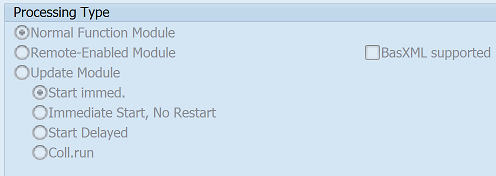
Pattern for FM REPORT_TEXT_PRINT_LINE - REPORT TEXT PRINT LINE
CALL FUNCTION 'REPORT_TEXT_PRINT_LINE' "Print a Text Module Line
  EXPORTING
    application =               " applclass     Application
*   langu = SY-LANGU            " sy-langu      Language
*   left_margin = 0             " i             Left margin
    line_number =               " sy-tabix      Line number
*   no_scrolling = 'X'          " flag          Text module type: 'T'itle, 'H'eader, ...
*   output_device = 'ABAP'      " c             Output unit
*   page_width = SY-LINSZ       " sy-linsz      Page width
*   right_margin = 0            " i             Right margin
    text_name =                 "               Text module name
    text_type =                 " rtxttype      Text module type: 'T'itle, 'H'eader, ...
*   reporting_table = SPACE     " rtxcs-rep_table
*   edit_program = SPACE        " sy-repid
*   mf_date = SY-DATLO          " sy-datlo
  IMPORTING
    text_line =                 "               Text line
* TABLES
*   common_symbols =            " rtxcsyms
*   fields =                    " rtxflds
*   variables =                 " rtxvars
  EXCEPTIONS
    INVALID_APPLICATION = 1     "               Invalid application
    INVALID_TEXT_TYPE = 2       "               Invalid text type
    TEXT_NOT_FOUND = 3          "               Text module not found
    .  "  REPORT_TEXT_PRINT_LINE
ABAP code example for Function Module REPORT_TEXT_PRINT_LINE
The ABAP code below is a full code listing to execute function module REPORT_TEXT_PRINT_LINE including all data declarations. The code uses the latest in-line data DECLARATION SYNTAX but I have included an ABAP code snippet at the end to show how declarations would look using the original method of declaring data variables up front. This will allow you to compare and fully understand the new inline method. Please note some of the newer syntax such as the @DATA is not available until a later 4.70 service pack (SP8).
| ld_text_line | TYPE STRING , |
| it_common_symbols | TYPE STANDARD TABLE OF RTXCSYMS,"TABLES PARAM |
| wa_common_symbols | LIKE LINE OF it_common_symbols , |
| it_fields | TYPE STANDARD TABLE OF RTXFLDS,"TABLES PARAM |
| wa_fields | LIKE LINE OF it_fields , |
| it_variables | TYPE STANDARD TABLE OF RTXVARS,"TABLES PARAM |
| wa_variables | LIKE LINE OF it_variables . |
DATA(ld_application) = 'Check type of data required'.
DATA(ld_langu) = 'Check type of data required'.
DATA(ld_left_margin) = 'Check type of data required'.
DATA(ld_line_number) = '123 '.
DATA(ld_no_scrolling) = '123 '.
DATA(ld_output_device) = '123 '.
DATA(ld_page_width) = '123 '.
DATA(ld_right_margin) = 'Check type of data required'.
DATA(ld_text_name) = 'some text here'.
DATA(ld_text_type) = 'Check type of data required'.
SELECT single REP_TABLE
FROM RTXCS
INTO @DATA(ld_reporting_table).
DATA(ld_edit_program) = '123 '.
DATA(ld_mf_date) = '20210129'.
"populate fields of struture and append to itab
append wa_common_symbols to it_common_symbols.
"populate fields of struture and append to itab
append wa_fields to it_fields.
"populate fields of struture and append to itab
append wa_variables to it_variables. . CALL FUNCTION 'REPORT_TEXT_PRINT_LINE' EXPORTING application = ld_application * langu = ld_langu * left_margin = ld_left_margin line_number = ld_line_number * no_scrolling = ld_no_scrolling * output_device = ld_output_device * page_width = ld_page_width * right_margin = ld_right_margin text_name = ld_text_name text_type = ld_text_type * reporting_table = ld_reporting_table * edit_program = ld_edit_program * mf_date = ld_mf_date IMPORTING text_line = ld_text_line * TABLES * common_symbols = it_common_symbols * fields = it_fields * variables = it_variables EXCEPTIONS INVALID_APPLICATION = 1 INVALID_TEXT_TYPE = 2 TEXT_NOT_FOUND = 3 . " REPORT_TEXT_PRINT_LINE
IF SY-SUBRC EQ 0. "All OK ELSEIF SY-SUBRC EQ 1. "Exception "Add code for exception here ELSEIF SY-SUBRC EQ 2. "Exception "Add code for exception here ELSEIF SY-SUBRC EQ 3. "Exception "Add code for exception here ENDIF.
ABAP code to compare 7.40 inline data declaration with original syntax
The below ABAP code uses the older none in-line data declarations. This allows you to see the coding differences/benefits of the later inline syntax. It may also be useful if you are using an older version of SAP as some of the newer syntax above, such as the @DATA is not available until 4.70 EHP 8.
DATA:
| ld_text_line | TYPE STRING , |
| ld_application | TYPE APPLCLASS , |
| it_common_symbols | TYPE STANDARD TABLE OF RTXCSYMS , |
| wa_common_symbols | LIKE LINE OF it_common_symbols, |
| ld_langu | TYPE SY-LANGU , |
| it_fields | TYPE STANDARD TABLE OF RTXFLDS , |
| wa_fields | LIKE LINE OF it_fields, |
| ld_left_margin | TYPE I , |
| it_variables | TYPE STANDARD TABLE OF RTXVARS , |
| wa_variables | LIKE LINE OF it_variables, |
| ld_line_number | TYPE SY-TABIX , |
| ld_no_scrolling | TYPE FLAG , |
| ld_output_device | TYPE C , |
| ld_page_width | TYPE SY-LINSZ , |
| ld_right_margin | TYPE I , |
| ld_text_name | TYPE STRING , |
| ld_text_type | TYPE RTXTTYPE , |
| ld_reporting_table | TYPE RTXCS-REP_TABLE , |
| ld_edit_program | TYPE SY-REPID , |
| ld_mf_date | TYPE SY-DATLO . |
ld_application = '20210129'.
"populate fields of struture and append to itab
append wa_common_symbols to it_common_symbols.
ld_langu = 'Check type of data required'.
"populate fields of struture and append to itab
append wa_fields to it_fields.
ld_left_margin = 'Check type of data required'.
"populate fields of struture and append to itab
append wa_variables to it_variables.
ld_line_number = '123 '.
ld_no_scrolling = '123 '.
ld_output_device = '123 '.
ld_page_width = '123 '.
ld_right_margin = 'Check type of data required'.
ld_text_name = 'some text here'.
ld_text_type = 'Check type of data required'.
SELECT single REP_TABLE
FROM RTXCS
INTO ld_reporting_table.
ld_edit_program = '123 '.
ld_mf_date = '20210129'.
Contribute (Add Comments)
Please help keep this info upto date and use the comments section below to add useful hints, tips and information specific to this SAP function. This will then be available for you and other users to easily find by simply searching on the object name REPORT_TEXT_PRINT_LINE or its description.