SAP Function Modules


RCCF_FUNCTION_IN SAP Function module - RCCF: Test Function Module for incoming Data
RCCF_FUNCTION_IN is a standard SAP function module available within R/3 SAP systems depending on your version and release level. Below is the pattern details for this FM showing its interface including any import and export parameters, exceptions etc as well as any documentation contributions (Comments) specific to the object.
See here to view full function module documentation and code listing, simply by entering the name RCCF_FUNCTION_IN into the relevant SAP transaction such as SE37 or SE80.
Associated Function Group:
RCC_TESTFUGR
Released Date:
Not Released
Processing type: Remote-Enabled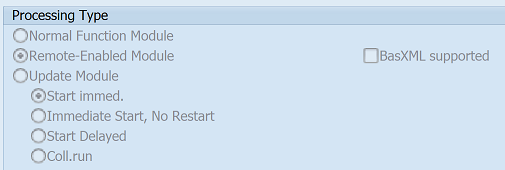
Pattern for FM RCCF_FUNCTION_IN - RCCF FUNCTION IN
CALL FUNCTION 'RCCF_FUNCTION_IN' "RCCF: Test Function Module for incoming Data
  EXPORTING
    is_param1 =                 " rccs_admin_process  Application-Relevant Engine Parameters
    iv_param2 =                 " int4          Natural number
    iv_param3 =                 " char10        Character Field Length = 10
    iv_param4 =                 " int1          Dummy for B20 int1 (Local Everywhere)
  IMPORTING
    es_param1 =                 " rccs_data_customerparameter  User Parameter in RCCF
    ev_param2 =                 " char10        Character Field Length = 10
  TABLES
    it_table1 =                 " rcct_log_handle  RCCF Binary Data Table
    et_table2 =                 " rcct_data_customerparameter  User Parameters
    .  "  RCCF_FUNCTION_IN
ABAP code example for Function Module RCCF_FUNCTION_IN
The ABAP code below is a full code listing to execute function module RCCF_FUNCTION_IN including all data declarations. The code uses the latest in-line data DECLARATION SYNTAX but I have included an ABAP code snippet at the end to show how declarations would look using the original method of declaring data variables up front. This will allow you to compare and fully understand the new inline method. Please note some of the newer syntax such as the @DATA is not available until a later 4.70 service pack (SP8).
| ld_es_param1 | TYPE RCCS_DATA_CUSTOMERPARAMETER , |
| ld_ev_param2 | TYPE CHAR10 , |
| it_it_table1 | TYPE STANDARD TABLE OF RCCT_LOG_HANDLE,"TABLES PARAM |
| wa_it_table1 | LIKE LINE OF it_it_table1 , |
| it_et_table2 | TYPE STANDARD TABLE OF RCCT_DATA_CUSTOMERPARAMETER,"TABLES PARAM |
| wa_et_table2 | LIKE LINE OF it_et_table2 . |
DATA(ld_is_param1) = 'Check type of data required'.
DATA(ld_iv_param2) = 'Check type of data required'.
DATA(ld_iv_param3) = 'Check type of data required'.
DATA(ld_iv_param4) = 'Check type of data required'.
"populate fields of struture and append to itab
append wa_it_table1 to it_it_table1.
"populate fields of struture and append to itab
append wa_et_table2 to it_et_table2. . CALL FUNCTION 'RCCF_FUNCTION_IN' EXPORTING is_param1 = ld_is_param1 iv_param2 = ld_iv_param2 iv_param3 = ld_iv_param3 iv_param4 = ld_iv_param4 IMPORTING es_param1 = ld_es_param1 ev_param2 = ld_ev_param2 TABLES it_table1 = it_it_table1 et_table2 = it_et_table2 . " RCCF_FUNCTION_IN
IF SY-SUBRC EQ 0. "All OK ENDIF.
ABAP code to compare 7.40 inline data declaration with original syntax
The below ABAP code uses the older none in-line data declarations. This allows you to see the coding differences/benefits of the later inline syntax. It may also be useful if you are using an older version of SAP as some of the newer syntax above, such as the @DATA is not available until 4.70 EHP 8.
DATA:
| ld_es_param1 | TYPE RCCS_DATA_CUSTOMERPARAMETER , |
| ld_is_param1 | TYPE RCCS_ADMIN_PROCESS , |
| it_it_table1 | TYPE STANDARD TABLE OF RCCT_LOG_HANDLE , |
| wa_it_table1 | LIKE LINE OF it_it_table1, |
| ld_ev_param2 | TYPE CHAR10 , |
| ld_iv_param2 | TYPE INT4 , |
| it_et_table2 | TYPE STANDARD TABLE OF RCCT_DATA_CUSTOMERPARAMETER , |
| wa_et_table2 | LIKE LINE OF it_et_table2, |
| ld_iv_param3 | TYPE CHAR10 , |
| ld_iv_param4 | TYPE INT1 . |
ld_is_param1 = 'Check type of data required'.
"populate fields of struture and append to itab
append wa_it_table1 to it_it_table1.
ld_iv_param2 = 'Check type of data required'.
"populate fields of struture and append to itab
append wa_et_table2 to it_et_table2.
ld_iv_param3 = 'Check type of data required'.
ld_iv_param4 = 'Check type of data required'.
Contribute (Add Comments)
Please help keep this info upto date and use the comments section below to add useful hints, tips and information specific to this SAP function. This will then be available for you and other users to easily find by simply searching on the object name RCCF_FUNCTION_IN or its description.
RCCF_FUNCTION_IN - RCCF: Test Function Module for incoming Data RCCF_COMM_SYSINFO - RFC System Information Module for External Engines RCCF_COMM_SET_ENGINE - RFC make the engine globally available RCCF_COMM_RESULT - RFC Results Module for External Engines RCCF_COMM_PROGRESS - RFC Status Module for External Engines RCCF_COMM_PERFINFO - RFC Performance Information Module for External Engines