SAP QEEM_INT_OPERATION_POSTING Function Module for NOTRANSL: Interne Schnittstelle QM-Ergebniserfassung; Sichern Prüfvorgang
QEEM_INT_OPERATION_POSTING is a standard qeem int operation posting SAP function module available within SAP R/3 or S/4 Hana systems, depending on your version and release level. It is used for NOTRANSL: Interne Schnittstelle QM-Ergebniserfassung; Sichern Prüfvorgang processing and below is the pattern details for this FM, showing its interface including any import and export parameters, exceptions etc. there is also a full "cut and paste" ABAP pattern code example, along with implementation ABAP coding, documentation and contribution comments specific to this or related objects.
See here to view full function module documentation and code listing for qeem int operation posting FM, simply by entering the name QEEM_INT_OPERATION_POSTING into the relevant SAP transaction such as SE37 or SE38.
Function Group: QEEM
Program Name: SAPLQEEM
Main Program: SAPLQEEM
Appliation area:
Release date: N/A
Mode(Normal, Remote etc): Normal Function Module
Update:
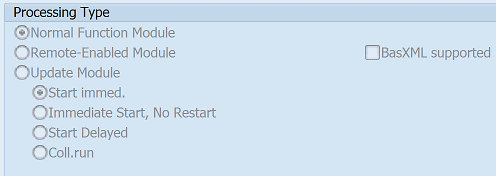
Function QEEM_INT_OPERATION_POSTING pattern details
In-order to call this FM within your sap programs, simply using the below ABAP pattern details to trigger the function call...or see the full ABAP code listing at the end of this article. You can simply cut and paste this code into your ABAP progrom as it is, including variable declarations.CALL FUNCTION 'QEEM_INT_OPERATION_POSTING'"NOTRANSL: Interne Schnittstelle QM-Ergebniserfassung; Sichern Prüfvorgang.
EXPORTING
* I_COMMIT_WORK_PROC = 'X' "Give comand COMMIT WORK to the data base_
* I_DATA_INITIALIZE_PROC = ' ' "Post internal tables and then initialize process_
* I_LOT_CHANGE_INITIALIZE_PROC = ' ' "Initialize base table for inspection lot_
* I_PARAM_INITIALIZE_PROC = ' ' "Initialize only the control indicator and work areas for results recording_
* I_DATA_POSTING_NO_INIT = ' ' "Update, no initialization
* I_ASYNC_POSTING_IDI = ' ' "
Customer Function user exits
Below is a list of CUSTOMER FUNCTION exit user exits that are available within this program and maybe relevant for this FM.EXIT_SAPLQEEM_001 Customer Function for Calculating Formulas in Results Recording
EXIT_SAPLQEEM_002 Customer Function: Add. Fns for Importing Insp. Chars in Results Recording
EXIT_SAPLQEEM_003 Customer Function: Add. Functions After Valuating Insp. Characteristics
EXIT_SAPLQEEM_004 Customer Function: Add. Functions After Valuating Partial Samples
EXIT_SAPLQEEM_006 Customer Function: Add. Functions After Closing Insp. Characteristics
EXIT_SAPLQEEM_007 Customer Exit: Additional Functions After Closing Partial Samples
EXIT_SAPLQEEM_011 Customer Function: Add. Functions Before Valuating Insp. Characteristics
EXIT_SAPLQEEM_012 Customer Function: Additional Functions Before Valuating Partial Samples
EXIT_SAPLQEEM_015 Customer Function: Add. Functions After Entering Individual Results
EXIT_SAPLQEEM_020 Customer Function: Additional Functions After Entering Inspector
EXIT_SAPLQEEM_021 Customer Function: Add. Functions for User Key +US1 (Char. Single Screen)
EXIT_SAPLQEEM_022 Customer Function: Add. Functions for User Key +US2 (Char. Single Screen)
EXIT_SAPLQEEM_023 Customer Function: Add. Functions for User Key +US3 (Char. Single Screen)
EXIT_SAPLQEEM_024 Customer Function: Add. Functions for User Key +US4 (Char. Single Screen)
EXIT_SAPLQEEM_025 Customer Function: Add. Functions for User Key +US1 as Pushbutton
EXIT_SAPLQEEM_026 Customer Function: Add. Functions for User Key +US2 as Pushbutton
EXIT_SAPLQEEM_027 Customer Function: Add. Functions for User Key +US3 as Pushbutton
EXIT_SAPLQEEM_028 Customer Function: Add. Functions for User Key +US4 as Pushbutton
EXIT_SAPLQEEM_029 Customer-Function for Subscreen Characteristic Overview
EXIT_SAPLQEEM_030 Customer Function for Subscreen Characteristic Single Screen
EXIT_SAPLQEEM_031 Customer Function Creating Table with External Numbers
EXIT_SAPLQEEM_032 Customer Function Characteristic Text in Logon Language
IMPORTING Parameters details for QEEM_INT_OPERATION_POSTING
I_COMMIT_WORK_PROC - Give comand COMMIT WORK to the data base_
Data type: QM00-QKZDefault: 'X'
Optional: Yes
Call by Reference: No ( called with pass by value option)
I_DATA_INITIALIZE_PROC - Post internal tables and then initialize process_
Data type: QM00-QKZDefault: SPACE
Optional: Yes
Call by Reference: No ( called with pass by value option)
I_LOT_CHANGE_INITIALIZE_PROC - Initialize base table for inspection lot_
Data type: QM00-QKZDefault: SPACE
Optional: Yes
Call by Reference: No ( called with pass by value option)
I_PARAM_INITIALIZE_PROC - Initialize only the control indicator and work areas for results recording_
Data type: QM00-QKZDefault: SPACE
Optional: Yes
Call by Reference: No ( called with pass by value option)
I_DATA_POSTING_NO_INIT - Update, no initialization
Data type: QM00-QKZDefault: SPACE
Optional: Yes
Call by Reference: No ( called with pass by value option)
I_ASYNC_POSTING_IDI -
Data type: QM00-QKZDefault: SPACE
Optional: Yes
Call by Reference: No ( called with pass by value option)
Copy and paste ABAP code example for QEEM_INT_OPERATION_POSTING Function Module
The ABAP code below is a full code listing to execute function module POPUP_TO_CONFIRM including all data declarations. The code uses the original data declarations rather than the latest in-line data DECLARATION SYNTAX but I have included an ABAP code snippet at the end to show how declarations would look using the newer method of declaring data variables on the fly. This will allow you to compare and fully understand the new inline method. Please note some of the newer syntax such as the @DATA is not available until a later 4.70 service pack (SP8), which i why i have stuck to the origianl for this example.| DATA: | ||||
| lv_i_commit_work_proc | TYPE QM00-QKZ, " 'X' | |||
| lv_i_data_initialize_proc | TYPE QM00-QKZ, " SPACE | |||
| lv_i_lot_change_initialize_proc | TYPE QM00-QKZ, " SPACE | |||
| lv_i_param_initialize_proc | TYPE QM00-QKZ, " SPACE | |||
| lv_i_data_posting_no_init | TYPE QM00-QKZ, " SPACE | |||
| lv_i_async_posting_idi | TYPE QM00-QKZ. " SPACE |
| CALL FUNCTION 'QEEM_INT_OPERATION_POSTING' "NOTRANSL: Interne Schnittstelle QM-Ergebniserfassung; Sichern Prüfvorgang |
| EXPORTING | ||
| I_COMMIT_WORK_PROC | = lv_i_commit_work_proc | |
| I_DATA_INITIALIZE_PROC | = lv_i_data_initialize_proc | |
| I_LOT_CHANGE_INITIALIZE_PROC | = lv_i_lot_change_initialize_proc | |
| I_PARAM_INITIALIZE_PROC | = lv_i_param_initialize_proc | |
| I_DATA_POSTING_NO_INIT | = lv_i_data_posting_no_init | |
| I_ASYNC_POSTING_IDI | = lv_i_async_posting_idi | |
| . " QEEM_INT_OPERATION_POSTING | ||
ABAP code using 7.40 inline data declarations to call FM QEEM_INT_OPERATION_POSTING
The below ABAP code uses the newer in-line data declarations. This allows you to see the coding differences/benefits of the later inline syntax. Please note some of the newer syntax below, such as the @DATA is not available until 4.70 EHP 8.| "SELECT single QKZ FROM QM00 INTO @DATA(ld_i_commit_work_proc). | ||||
| DATA(ld_i_commit_work_proc) | = 'X'. | |||
| "SELECT single QKZ FROM QM00 INTO @DATA(ld_i_data_initialize_proc). | ||||
| DATA(ld_i_data_initialize_proc) | = ' '. | |||
| "SELECT single QKZ FROM QM00 INTO @DATA(ld_i_lot_change_initialize_proc). | ||||
| DATA(ld_i_lot_change_initialize_proc) | = ' '. | |||
| "SELECT single QKZ FROM QM00 INTO @DATA(ld_i_param_initialize_proc). | ||||
| DATA(ld_i_param_initialize_proc) | = ' '. | |||
| "SELECT single QKZ FROM QM00 INTO @DATA(ld_i_data_posting_no_init). | ||||
| DATA(ld_i_data_posting_no_init) | = ' '. | |||
| "SELECT single QKZ FROM QM00 INTO @DATA(ld_i_async_posting_idi). | ||||
| DATA(ld_i_async_posting_idi) | = ' '. | |||
Search for further information about these or an SAP related objects