SAP EXIT_SAPLQEEM_029 Function Module for Customer-Function for Subscreen Characteristic Overview
EXIT_SAPLQEEM_029 is a standard exit saplqeem 029 SAP function module available within SAP R/3 or S/4 Hana systems, depending on your version and release level. It is used for Customer-Function for Subscreen Characteristic Overview processing and below is the pattern details for this FM, showing its interface including any import and export parameters, exceptions etc. there is also a full "cut and paste" ABAP pattern code example, along with implementation ABAP coding, documentation and contribution comments specific to this or related objects.
See here to view full function module documentation and code listing for exit saplqeem 029 FM, simply by entering the name EXIT_SAPLQEEM_029 into the relevant SAP transaction such as SE37 or SE38.
Function Group: XQEE
Program Name: SAPLXQEE
Main Program:
Appliation area: Q
Release date: N/A
Mode(Normal, Remote etc): Normal Function Module
Update:
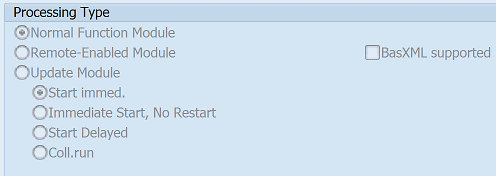
Function EXIT_SAPLQEEM_029 pattern details
In-order to call this FM within your sap programs, simply using the below ABAP pattern details to trigger the function call...or see the full ABAP code listing at the end of this article. You can simply cut and paste this code into your ABAP progrom as it is, including variable declarations.CALL FUNCTION 'EXIT_SAPLQEEM_029'"Customer-Function for Subscreen Characteristic Overview.
EXPORTING
I_QALS = "Work Area for Inspection Lot
I_QAPO = "Work Area for Operation
* I_QAPP = "Work Area for Inspection Point
I_QAQEE = "Screen Work Area
* I_QALT = "Work Area for Partial Lot
IMPORTING
E_PGMID = "Program Name
E_DYNNR_PIC_GRO_EE = "Subscreen
Related Function Modules
Below is a list of related SAP function modules this CUSTOMER FUNCTION exit / user exit is relevant for.QEEM_AUTHORITY_CHECK_CHAR Check authorization for status change of an inspection characteristic
QEEM_CHARACTERISTIC_RES_RECORD NOTRANSL: Aufruf der Transaktion Ergebnisse erfassen als Funktionsbaustein
QEEM_CHAR_RESULTS_DIALOG NOTRANSL: Ergebnisse erfassen als Dialog
QEEM_CONVERSION_TO_SAMPLE_IP NOTRANSL: Umwandlung der Probentabelle in Merkmalsstruktur in Probenstrukt
QEEM_ERFASSUNGSKONFIGURATION NOTRANSL: Ermittlung der Parameter für die Erfassungskonfiguration
QEEM_FAILURE_DELETION Deletion of automatic defect
QEEM_FAILURE_GENERATION Generation of a automatic defect
QEEM_FEATURES_PROCESSING NOTRANSL: Funktionsbaustein für merkmalsweise Ergebniserfassung
QEEM_FETCH_ALL_QAKLTAB NOTRANSL: Holen der Klassenwerte über alle Stichproben zu einem Merkmal
QEEM_FETCH_ALL_QASETAB NOTRANSL: Holen der Einzelwerte über alle Stichproben zu einem Merkmal
QEEM_FETCH_LAST_QAKLTAB NOTRANSL: Holen der Klassentabelle (klassierte Erfassung)
QEEM_FETCH_LAST_QAMKTAB NOTRANSL: Holen der Merkmalstabelle
QEEM_FETCH_LAST_QASETAB NOTRANSL: Holen der Einzelwerttabelle
QEEM_FETCH_LAST_QASPTAB NOTRANSL: Holen der Stichprobentabelle
QEEM_FETCH_MKERRTAB NOTRANSL: Merkmalsprotokoll lesen
QEEM_FETCH__QASETAB_ALL Delete FM
QEEM_GET_CHARACTERISTIC_DATA NOTRANSL: Gibt die Merkmalsdaten zum Prüflos aus interner Tabelle oder von
QEEM_GET_FLAG_FOR_COMMIT NOTRANSL: Fkt.Baustein prüft innerhalb der EE, ob Daten zum Sichern ansteh
QEEM_INT_CANCEL_SAMPLE NOTRANSL: Interne Schnittstelle QM-Ergebniserfassung; Stornieren Probe
QEEM_INT_CANCEL_VALUE NOTRANSL: Interne Schnittstelle QM-Ergebniserfassung; Stornieren Urwert
QEEM_INT_FEATURE_CLOSING NOTRANSL: Interne Schnittstelle QM-Ergebniserfassung; Abschließen Merkmal
QEEM_INT_FEATURE_RECORDING NOTRANSL: Interne Schnittstelle QM-Ergebniserfassung; Übernahme Merkmalser
QEEM_INT_OPERATION_POSTING NOTRANSL: Interne Schnittstelle QM-Ergebniserfassung; Sichern Prüfvorgang
QEEM_INT_OPERATION_RESET NOTRANSL: Funktionsbaustein zum zurücksetzen interner Tabellen zum Vorgang
QEEM_INT_SAMPLE_CLOSING NOTRANSL: Interne Schnittstelle QM-Ergebniserfassung; Abschließen Probe
QEEM_INT_SAMPLE_RECORDING NOTRANSL: Interne Schnittstelle QM-Ergebniserfassung; Übernahme Probenerge
QEEM_INT_VALUE_RECORDING NOTRANSL: Interne Schnittstelle QM-Ergebniserfassung; Übernahme Urwerte
QEEM_MASCHINE_CHECK NOTRANSL: Überprüfung FHM im Feld MASCHINE
QEEM_PREPARE_CHAR_SUM_DATA NOTRANSL: Do not use:Aufbereitung der summarischen Felder für eine Merkmal
QEEM_PRLTEXTKZ NOTRANSL: Langtextkennzeichen zur Prüfbemerkung
QEEM_PRLTEXTKZ_CHANGE NOTRANSL: Veränderung der Probennumer der Langtextschlüssels
QEEM_PRLTEXTKZ_INITIALIZE NOTRANSL: Initialisierung der Langtexttabelle
QEEM_QEDS_FLAG_SET NOTRANSL: Überprüfen, ob Aufruf aus REPORT RQEEAMDS erfolgt
QEEM_REFRESH_FAILURE_AND_STAT NOTRANSL: Zurücksetzen von Fehlerdaten und Statuseinträgen
QEEM_SERIALNUMBER_GET NOTRANSL: Ermittlung aller Serialnummern (bzw. Prüflingsnummern) zu einem
QEEM_SET_TA_IS_BOBF_MANAGED Indicate whether transaction is managed by BOBF
QEEM_UNPLANNED_CHARACTERISTICS NOTRANSL: Anlegen zusätzlicher Prüfmerkmale zum Auftrag
QEEM_USAGE_SERIALNUMBER NOTRANSL: Überprüft ob Serialnummer verwendet wird
IMPORTING Parameters details for EXIT_SAPLQEEM_029
I_QALS - Work Area for Inspection Lot
Data type: QALSOptional: No
Call by Reference: No ( called with pass by value option)
I_QAPO - Work Area for Operation
Data type: QAPOOptional: No
Call by Reference: No ( called with pass by value option)
I_QAPP - Work Area for Inspection Point
Data type: QAPPOptional: Yes
Call by Reference: No ( called with pass by value option)
I_QAQEE - Screen Work Area
Data type: QAQEEOptional: No
Call by Reference: No ( called with pass by value option)
I_QALT - Work Area for Partial Lot
Data type: QALTOptional: Yes
Call by Reference: No ( called with pass by value option)
EXPORTING Parameters details for EXIT_SAPLQEEM_029
E_PGMID - Program Name
Data type: SY-REPIDOptional: No
Call by Reference: No ( called with pass by value option)
E_DYNNR_PIC_GRO_EE - Subscreen
Data type: SY-DYNNROptional: No
Call by Reference: No ( called with pass by value option)
Copy and paste ABAP code example for EXIT_SAPLQEEM_029 Function Module
The ABAP code below is a full code listing to execute function module POPUP_TO_CONFIRM including all data declarations. The code uses the original data declarations rather than the latest in-line data DECLARATION SYNTAX but I have included an ABAP code snippet at the end to show how declarations would look using the newer method of declaring data variables on the fly. This will allow you to compare and fully understand the new inline method. Please note some of the newer syntax such as the @DATA is not available until a later 4.70 service pack (SP8), which i why i have stuck to the origianl for this example.| DATA: | ||||
| lv_i_qals | TYPE QALS, " | |||
| lv_e_pgmid | TYPE SY-REPID, " | |||
| lv_i_qapo | TYPE QAPO, " | |||
| lv_e_dynnr_pic_gro_ee | TYPE SY-DYNNR, " | |||
| lv_i_qapp | TYPE QAPP, " | |||
| lv_i_qaqee | TYPE QAQEE, " | |||
| lv_i_qalt | TYPE QALT. " |
| CALL FUNCTION 'EXIT_SAPLQEEM_029' "Customer-Function for Subscreen Characteristic Overview |
| EXPORTING | ||
| I_QALS | = lv_i_qals | |
| I_QAPO | = lv_i_qapo | |
| I_QAPP | = lv_i_qapp | |
| I_QAQEE | = lv_i_qaqee | |
| I_QALT | = lv_i_qalt | |
| IMPORTING | ||
| E_PGMID | = lv_e_pgmid | |
| E_DYNNR_PIC_GRO_EE | = lv_e_dynnr_pic_gro_ee | |
| . " EXIT_SAPLQEEM_029 | ||
ABAP code using 7.40 inline data declarations to call FM EXIT_SAPLQEEM_029
The below ABAP code uses the newer in-line data declarations. This allows you to see the coding differences/benefits of the later inline syntax. Please note some of the newer syntax below, such as the @DATA is not available until 4.70 EHP 8.| "SELECT single REPID FROM SY INTO @DATA(ld_e_pgmid). | ||||
| "SELECT single DYNNR FROM SY INTO @DATA(ld_e_dynnr_pic_gro_ee). | ||||
Search for further information about these or an SAP related objects