SAP EXIT_SAPLINST_001 Function Module for 111
EXIT_SAPLINST_001 is a standard exit saplinst 001 SAP function module available within SAP R/3 or S/4 Hana systems, depending on your version and release level. It is used for 111 processing and below is the pattern details for this FM, showing its interface including any import and export parameters, exceptions etc. there is also a full "cut and paste" ABAP pattern code example, along with implementation ABAP coding, documentation and contribution comments specific to this or related objects.
See here to view full function module documentation and code listing for exit saplinst 001 FM, simply by entering the name EXIT_SAPLINST_001 into the relevant SAP transaction such as SE37 or SE38.
Function Group: XAD2
Program Name: SAPLXAD2
Main Program:
Appliation area:
Release date: N/A
Mode(Normal, Remote etc): Normal Function Module
Update:
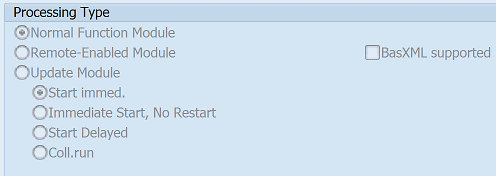
Function EXIT_SAPLINST_001 pattern details
In-order to call this FM within your sap programs, simply using the below ABAP pattern details to trigger the function call...or see the full ABAP code listing at the end of this article. You can simply cut and paste this code into your ABAP progrom as it is, including variable declarations.CALL FUNCTION 'EXIT_SAPLINST_001'"111.
EXPORTING
* I_IND_TYPE = 'A' "I:Individual, A:Assembly, S:Structure, G:General
* I_PLNAL = ' ' "Group counter
* I_DATUM = SY-DATUM "Date and Time, Current (Application Server) Date
* I_EQUNR = ' ' "Equipment number
* I_TPLNR = ' ' "Functional Location
* I_BAUTL = ' ' "Assembly
* I_IWERK = ' ' "Maintenance planning plant
* I_STRAT = ' ' "Maintenance strategy
* I_IND_WPLAN = ' ' "
* I_PLNTY = ' ' "Task List Type
* I_PLNNR = ' ' "Key for Task List Group
IMPORTING
E_EXIT = "
TABLES
SEL_TAB = "Display Structure Maint. Task Lists
Related Function Modules
Below is a list of related SAP function modules this CUSTOMER FUNCTION exit / user exit is relevant for.AUFTYP_SHLP_EXIT NOTRANSL: Suchhilfe-Exit zur Bestimmung des Auftragstyps
CHECK_SWERK_IWERK NOTRANSL: Prüfung von SWERK und IWERK auf Kompatibilität von KOKRS und BUK
CHECK_SWERK_WERGW NOTRANSL: Prüfung von SWERK und WERGW auf Kompatibilität von KOKRS und BUK
CHK_GSBER_OBLIGATORY NOTRANSL: Prüfen ob für Werk Geschäftsbereichspflicht besteht
ILART_CHECK NOTRANSL: Prüfen der IH-Leistungsart (ggf. in Abhängigkeit von der Auftrag
INGPR_READ NOTRANSL: IH-Planergruppe prüfen und evtl. Namen lesen
MAINTENANCE_CATALOG_READ NOTRANSL: Eingabeverprobung zum Berichtsschema und Lesen Text
PARAMETER_GET_MCS NOTRANSL: PM/SM globale Parameter PM/SM (T399J)
PM_CHECK_SALES_ORG NOTRANSL: Vertriebsorganisationsdaten und IH-Werk auf Vereinbarkeit überpr
PM_CHECK_WERKE NOTRANSL: Prüfung zweier Werke auf gleiche Kostenstellen- u. Buchungskreis
PM_GET_LOCAL_CURRENCY NOTRANSL: Prüfung zweier Werke auf gleiche Kostenstellen- u. Buchungskreis
PM_GET_PC NOTRANSL: Profitcenter aus Kostenstelle des Arbeitsplatzes ermitteln
PM_GET_PROFIL NOTRANSL: IH-Auftrag: Ermitteln der Profile
PM_GET_VARIANT NOTRANSL: PM: Ermittlung einer Variante für einen Report
PM_ICONS_ASSIGN NOTRANSL: Dynamische Zuweisung von Ikonen an Dynprofelder
PM_ORDERTYP_CHECK NOTRANSL: Prüfen der IH-Auftragsart (ggf. in Abhängigkeit vom IH-Werk)
PM_READ_IWERK NOTRANSL: Lesen des IH-Planungswerk aus T399I
PM_ROUTINGS_SELECTION NOTRANSL: PM Selektion von Arbeitsplänen/Anleitungen
PRIOR_CHECK NOTRANSL: Priorität prüfen und Tabellen-WAs übergeben
T350E_READ NOTRANSL: Lesen Tabelle T350W (Adreßfolgensteuerung Einkaufsdaten Instandh
T350W_READ NOTRANSL: Lesen Tabelle T350W (Auftragsart Instandhaltung)
T350_READ NOTRANSL: Lesen Tabelle T350 und T350_t (Vorschlag ILA zur Auftragsart)
T352R_READ NOTRANSL: Revisionsnummer prüfen und Tabellen-WA übergeben
T357M_CHECK NOTRANSL: Prüfen des betriebszustands; Rückgabe der Bezeichnung
VALTYPE_SHLP_EXIT NOTRANSL: Suchhilfe-Exit der Suchhilfe MCH1
IMPORTING Parameters details for EXIT_SAPLINST_001
I_IND_TYPE - I:Individual, A:Assembly, S:Structure, G:General
Data type:Default: 'A'
Optional: No
Call by Reference: Yes
I_PLNAL - Group counter
Data type: PLKO-PLNALDefault: SPACE
Optional: No
Call by Reference: Yes
I_DATUM - Date and Time, Current (Application Server) Date
Data type: SY-DATUMDefault: SY-DATUM
Optional: No
Call by Reference: Yes
I_EQUNR - Equipment number
Data type: EQUI-EQUNRDefault: SPACE
Optional: No
Call by Reference: Yes
I_TPLNR - Functional Location
Data type: IFLOT-TPLNRDefault: SPACE
Optional: No
Call by Reference: Yes
I_BAUTL - Assembly
Data type: RIWO1-BAUTLDefault: SPACE
Optional: No
Call by Reference: Yes
I_IWERK - Maintenance planning plant
Data type: T001W-IWERKDefault: SPACE
Optional: No
Call by Reference: Yes
I_STRAT - Maintenance strategy
Data type: MPLA-STRATDefault: SPACE
Optional: No
Call by Reference: Yes
I_IND_WPLAN -
Data type:Default: SPACE
Optional: No
Call by Reference: Yes
I_PLNTY - Task List Type
Data type: PLKO-PLNTYDefault: SPACE
Optional: No
Call by Reference: Yes
I_PLNNR - Key for Task List Group
Data type: PLKO-PLNNRDefault: SPACE
Optional: No
Call by Reference: Yes
EXPORTING Parameters details for EXIT_SAPLINST_001
E_EXIT -
Data type:Optional: No
Call by Reference: Yes
TABLES Parameters details for EXIT_SAPLINST_001
SEL_TAB - Display Structure Maint. Task Lists
Data type: RIHPLKOOptional: No
Call by Reference: Yes
Copy and paste ABAP code example for EXIT_SAPLINST_001 Function Module
The ABAP code below is a full code listing to execute function module POPUP_TO_CONFIRM including all data declarations. The code uses the original data declarations rather than the latest in-line data DECLARATION SYNTAX but I have included an ABAP code snippet at the end to show how declarations would look using the newer method of declaring data variables on the fly. This will allow you to compare and fully understand the new inline method. Please note some of the newer syntax such as the @DATA is not available until a later 4.70 service pack (SP8), which i why i have stuck to the origianl for this example.| DATA: | ||||
| lv_e_exit | TYPE STRING, " | |||
| lt_sel_tab | TYPE STANDARD TABLE OF RIHPLKO, " | |||
| lv_i_ind_type | TYPE RIHPLKO, " 'A' | |||
| lv_i_plnal | TYPE PLKO-PLNAL, " SPACE | |||
| lv_i_datum | TYPE SY-DATUM, " SY-DATUM | |||
| lv_i_equnr | TYPE EQUI-EQUNR, " SPACE | |||
| lv_i_tplnr | TYPE IFLOT-TPLNR, " SPACE | |||
| lv_i_bautl | TYPE RIWO1-BAUTL, " SPACE | |||
| lv_i_iwerk | TYPE T001W-IWERK, " SPACE | |||
| lv_i_strat | TYPE MPLA-STRAT, " SPACE | |||
| lv_i_ind_wplan | TYPE MPLA, " SPACE | |||
| lv_i_plnty | TYPE PLKO-PLNTY, " SPACE | |||
| lv_i_plnnr | TYPE PLKO-PLNNR. " SPACE |
| CALL FUNCTION 'EXIT_SAPLINST_001' "111 |
| EXPORTING | ||
| I_IND_TYPE | = lv_i_ind_type | |
| I_PLNAL | = lv_i_plnal | |
| I_DATUM | = lv_i_datum | |
| I_EQUNR | = lv_i_equnr | |
| I_TPLNR | = lv_i_tplnr | |
| I_BAUTL | = lv_i_bautl | |
| I_IWERK | = lv_i_iwerk | |
| I_STRAT | = lv_i_strat | |
| I_IND_WPLAN | = lv_i_ind_wplan | |
| I_PLNTY | = lv_i_plnty | |
| I_PLNNR | = lv_i_plnnr | |
| IMPORTING | ||
| E_EXIT | = lv_e_exit | |
| TABLES | ||
| SEL_TAB | = lt_sel_tab | |
| . " EXIT_SAPLINST_001 | ||
ABAP code using 7.40 inline data declarations to call FM EXIT_SAPLINST_001
The below ABAP code uses the newer in-line data declarations. This allows you to see the coding differences/benefits of the later inline syntax. Please note some of the newer syntax below, such as the @DATA is not available until 4.70 EHP 8.| DATA(ld_i_ind_type) | = 'A'. | |||
| "SELECT single PLNAL FROM PLKO INTO @DATA(ld_i_plnal). | ||||
| DATA(ld_i_plnal) | = ' '. | |||
| "SELECT single DATUM FROM SY INTO @DATA(ld_i_datum). | ||||
| DATA(ld_i_datum) | = SY-DATUM. | |||
| "SELECT single EQUNR FROM EQUI INTO @DATA(ld_i_equnr). | ||||
| DATA(ld_i_equnr) | = ' '. | |||
| "SELECT single TPLNR FROM IFLOT INTO @DATA(ld_i_tplnr). | ||||
| DATA(ld_i_tplnr) | = ' '. | |||
| "SELECT single BAUTL FROM RIWO1 INTO @DATA(ld_i_bautl). | ||||
| DATA(ld_i_bautl) | = ' '. | |||
| "SELECT single IWERK FROM T001W INTO @DATA(ld_i_iwerk). | ||||
| DATA(ld_i_iwerk) | = ' '. | |||
| "SELECT single STRAT FROM MPLA INTO @DATA(ld_i_strat). | ||||
| DATA(ld_i_strat) | = ' '. | |||
| DATA(ld_i_ind_wplan) | = ' '. | |||
| "SELECT single PLNTY FROM PLKO INTO @DATA(ld_i_plnty). | ||||
| DATA(ld_i_plnty) | = ' '. | |||
| "SELECT single PLNNR FROM PLKO INTO @DATA(ld_i_plnnr). | ||||
| DATA(ld_i_plnnr) | = ' '. | |||
Search for further information about these or an SAP related objects