SAP TABLEPROC_EEWA Function Module for
TABLEPROC_EEWA is a standard tableproc eewa SAP function module available within SAP R/3 or S/4 Hana systems, depending on your version and release level. It is used to perform a specific ABAP function and below is the pattern details, showing its interface including any import and export parameters, exceptions etc. there is also a full "cut and paste" ABAP pattern code example, along with implementation ABAP coding, documentation and contribution comments specific to this or related objects.
See here to view full function module documentation and code listing for tableproc eewa FM, simply by entering the name TABLEPROC_EEWA into the relevant SAP transaction such as SE37 or SE38.
Function Group: EEWA
Program Name: SAPLEEWA
Main Program: SAPLEEWA
Appliation area:
Release date: N/A
Mode(Normal, Remote etc): Normal Function Module
Update:
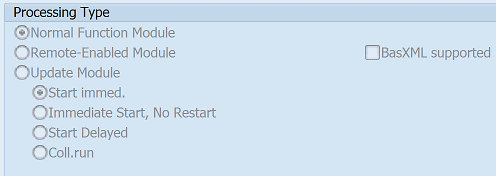
Function TABLEPROC_EEWA pattern details
In-order to call this FM within your sap programs, simply using the below ABAP pattern details to trigger the function call...or see the full ABAP code listing at the end of this article. You can simply cut and paste this code into your ABAP progrom as it is, including variable declarations.CALL FUNCTION 'TABLEPROC_EEWA'".
EXPORTING
* FCODE = 'RDED' "Desired Function of the Module
* VIEW_ACTION = 'S' "Activity w. Table: Dis./Chan./Transp. (S/U/T)
VIEW_NAME = "Table Name
* CORR_NUMBER = ' ' "Correction Number for Changes Made
IMPORTING
LAST_ACT_ENTRY = "Index of Cursor Position in Display Table
UCOMM = "Last User Command in View Maintenance
UPDATE_REQUIRED = "Indicator: You Must Save the Changed Entries
TABLES
CORR_KEYTAB = "Table with Keys of Entries to Be Transported
DBA_SELLIST = "Selection Conditions for Database Access
DPL_SELLIST = "Selection Conditions for Display
EXCL_CUA_FUNCT = "Table of CUA Functions Not to Be Activated
EXTRACT = "Table of Currently-Displayed Data (Display Table)
TOTAL = "Table Containing all Data Read from Database
X_HEADER = "Control Block Table for the Table
X_NAMTAB = "Control Block Table for the Table Fields
EXCEPTIONS
MISSING_CORR_NUMBER = 1 SAVING_CORRECTION_FAILED = 2
Customer Function user exits
Below is a list of CUSTOMER FUNCTION exit user exits that are available within this program and maybe relevant for this FM.EXIT_SAPLEEWA_BILLING_001 Check Billing-Relevant Values in Waste Billing Category
EXIT_SAPLEEWA_BULKY_001 Capacity Check and Processing
EXIT_SAPLEEWA_BULKY_002 Enhancement for Capacity Manipulation
EXIT_SAPLEEWA_BULKY_003 Prepares the SUBSCREEN PBO Call
EXIT_SAPLEEWA_BULKY_004 After PAI Customer Subscreen
EXIT_SAPLEEWA_BULKY_005 Follow-Up Action for Bulk Waste Order
EXIT_SAPLEEWA_BULKY_006 Adjust Bulk Waste Objects
EXIT_SAPLEEWA_BULKY_007 Define Account Group
EXIT_SAPLEEWA_CAPAB_001 Enhancement of Route Limitation for Day Capacity
EXIT_SAPLEEWA_CAPAB_002 Before PBO Customer Subscreen
EXIT_SAPLEEWA_CAPAB_003 After PAI Customer Subscreen
EXIT_SAPLEEWA_CLEAN_001 Prepares Customer Subscreen Call of Header Data
EXIT_SAPLEEWA_CLEAN_002 Prepares CALL SUBSCREEN PAI for Customer Fields
EXIT_SAPLEEWA_CLEAN_003 Closes CALL SUBSCREEN PAI of Customer Fields
EXIT_SAPLEEWA_CLEAN_004 Prepares the Item Data Fill with Customer Values
EXIT_SAPLEEWA_CLEAN_005 Customer-specific Checks on Property Item Data
EXIT_SAPLEEWA_CLEAN_006 Transfers Customer Field Changes to Property Object
EXIT_SAPLEEWA_MD_LOC_001 Enhanced Check on Container Portion
EXIT_SAPLEEWA_MD_LOC_002 Call CUSTOMER SUBSCREEN in Container Location for Period PBO
EXIT_SAPLEEWA_MD_LOC_003 Prepares Call of Customer Subscreen in Container Location for Period PAI
EXIT_SAPLEEWA_MD_LOC_004 Transfers Changes to Container Location Data from Customer Subscreen
EXIT_SAPLEEWA_MD_LOC_005 Save Customer-specific Data on Container Location
EXIT_SAPLEEWA_MD_ROUTE_001 Checks for Comparison: Service Frequency for Route/Container
EXIT_SAPLEEWA_MD_ROUTE_002 Prepares Customer Subscreen Call of Route
EXIT_SAPLEEWA_MD_ROUTE_003 Prepares Customer Subscreen (PAI) of Route
EXIT_SAPLEEWA_MD_ROUTE_004 Closes Route Customer Subscreen (PAI)
EXIT_SAPLEEWA_MD_RO_001 Check Default Route for Service Frequency
EXIT_SAPLEEWA_MD_RO_002 Check on Admissibility of Service Interval Grouping
EXIT_SAPLEEWA_MD_RO_004 Prepares the Customer Subscreen Call for Header Data
EXIT_SAPLEEWA_MD_RO_005 Prepares the CALL SUBSCREEN PAI for Header Data
EXIT_SAPLEEWA_MD_RO_006 Closes the CALL SUBSCREEN PAI of the Header Data
EXIT_SAPLEEWA_MD_RO_007 Prepares the Customer Subscreen Call for Item Data
EXIT_SAPLEEWA_MD_RO_008 Prepares the CALL SUBSCREEN PAI for Item Data
EXIT_SAPLEEWA_MD_RO_009 Closes the CALL SUBSCREEN PAI of the Item Data
EXIT_SAPLEEWA_ORDER_002 Confirmation of Item and Weight Data Check
EXIT_SAPLEEWA_ORDER_003 Determination of Customer Fields Before Confirmation of Item Data
EXIT_SAPLEEWA_ORDER_004 Customer-Specific Activities Before Saving Confirmation
EXIT_SAPLEEWA_ORDER_DISPO_001 Display Message After Capacity Check
EXIT_SAPLEEWA_ORDER_INT_001 Calculate Planned Values for Waste Disposal Order
EXIT_SAPLEEWA_ORDER_INT_002 Supplying Header Data of Waste Disposal Order with Customer Data
EXIT_SAPLEEWA_ORDER_INT_003 Supplying Item Data of Waste Disposal Order with Customer Data
EXIT_SAPLEEWA_ORDER_INT_004 Enter all Data for Structure IVB_W for Extrapolation of Waste Disp. Orders
EXIT_SAPLEEWA_ORDER_RESULT_001 Check Confirmation of Header Data
EXIT_SAPLEEWA_ORDER_RESULT_002 Determination of Header Data Before Confirmation of Header Data
EXIT_SAPLEEWA_ORDER_RESULT_003 Determination of Item Data Before Confirmation of Item Data
EXIT_SAPLEEWA_ORDER_RESULT_004 Update of Header Data After Confirmation
EXIT_SAPLEEWA_ORDER_RESULT_005 Updating Item Data After Confirmation
EXIT_SAPLEEWA_RESPL_001 Enhancement of Employee Attendance Status
EXIT_SAPLEEWA_RESPL_002 Enhancement for Checking Vehicle Use
EXIT_SAPLEEWA_RESPL_003
EXIT_SAPLEEWA_ROB_001 Prepares Customer Subscreen Call
EXIT_SAPLEEWA_ROB_002 Prepares CALL SUBSCREEN PAI for Customer Fields
EXIT_SAPLEEWA_ROB_003 Closes CALL SUBSCREEN PAI of Customer Fields
EXIT_SAPLEEWA_V_001 Allocate Table Name to Customer-Specific Fields
IMPORTING Parameters details for TABLEPROC_EEWA
FCODE - Desired Function of the Module
Data type:Default: 'RDED'
Optional: No
Call by Reference: No ( called with pass by value option)
VIEW_ACTION - Activity w. Table: Dis./Chan./Transp. (S/U/T)
Data type:Default: 'S'
Optional: No
Call by Reference: No ( called with pass by value option)
VIEW_NAME - Table Name
Data type: DD02V-TABNAMEOptional: No
Call by Reference: No ( called with pass by value option)
CORR_NUMBER - Correction Number for Changes Made
Data type: E070-TRKORRDefault: ' '
Optional: No
Call by Reference: No ( called with pass by value option)
EXPORTING Parameters details for TABLEPROC_EEWA
LAST_ACT_ENTRY - Index of Cursor Position in Display Table
Data type:Optional: No
Call by Reference: No ( called with pass by value option)
UCOMM - Last User Command in View Maintenance
Data type:Optional: No
Call by Reference: No ( called with pass by value option)
UPDATE_REQUIRED - Indicator: You Must Save the Changed Entries
Data type:Optional: No
Call by Reference: No ( called with pass by value option)
TABLES Parameters details for TABLEPROC_EEWA
CORR_KEYTAB - Table with Keys of Entries to Be Transported
Data type: E071KOptional: No
Call by Reference: No ( called with pass by value option)
DBA_SELLIST - Selection Conditions for Database Access
Data type: VIMSELLISTOptional: No
Call by Reference: No ( called with pass by value option)
DPL_SELLIST - Selection Conditions for Display
Data type: VIMSELLISTOptional: No
Call by Reference: No ( called with pass by value option)
EXCL_CUA_FUNCT - Table of CUA Functions Not to Be Activated
Data type: VIMEXCLFUNOptional: No
Call by Reference: No ( called with pass by value option)
EXTRACT - Table of Currently-Displayed Data (Display Table)
Data type:Optional: No
Call by Reference: No ( called with pass by value option)
TOTAL - Table Containing all Data Read from Database
Data type:Optional: No
Call by Reference: No ( called with pass by value option)
X_HEADER - Control Block Table for the Table
Data type: VIMDESCOptional: No
Call by Reference: No ( called with pass by value option)
X_NAMTAB - Control Block Table for the Table Fields
Data type: VIMNAMTABOptional: No
Call by Reference: No ( called with pass by value option)
EXCEPTIONS details
MISSING_CORR_NUMBER - Correction Number Missing
Data type:Optional: No
Call by Reference: No ( called with pass by value option)
SAVING_CORRECTION_FAILED - Error(s) While Saving Correction Entries
Data type:Optional: No
Call by Reference: No ( called with pass by value option)
Copy and paste ABAP code example for TABLEPROC_EEWA Function Module
The ABAP code below is a full code listing to execute function module POPUP_TO_CONFIRM including all data declarations. The code uses the original data declarations rather than the latest in-line data DECLARATION SYNTAX but I have included an ABAP code snippet at the end to show how declarations would look using the newer method of declaring data variables on the fly. This will allow you to compare and fully understand the new inline method. Please note some of the newer syntax such as the @DATA is not available until a later 4.70 service pack (SP8), which i why i have stuck to the origianl for this example.| DATA: | ||||
| lv_fcode | TYPE STRING, " 'RDED' | |||
| lt_corr_keytab | TYPE STANDARD TABLE OF E071K, " | |||
| lv_last_act_entry | TYPE E071K, " | |||
| lv_missing_corr_number | TYPE E071K, " | |||
| lv_ucomm | TYPE E071K, " | |||
| lt_dba_sellist | TYPE STANDARD TABLE OF VIMSELLIST, " | |||
| lv_view_action | TYPE VIMSELLIST, " 'S' | |||
| lv_saving_correction_failed | TYPE VIMSELLIST, " | |||
| lv_view_name | TYPE DD02V-TABNAME, " | |||
| lt_dpl_sellist | TYPE STANDARD TABLE OF VIMSELLIST, " | |||
| lv_update_required | TYPE VIMSELLIST, " | |||
| lv_corr_number | TYPE E070-TRKORR, " ' ' | |||
| lt_excl_cua_funct | TYPE STANDARD TABLE OF VIMEXCLFUN, " | |||
| lt_extract | TYPE STANDARD TABLE OF VIMEXCLFUN, " | |||
| lt_total | TYPE STANDARD TABLE OF VIMEXCLFUN, " | |||
| lt_x_header | TYPE STANDARD TABLE OF VIMDESC, " | |||
| lt_x_namtab | TYPE STANDARD TABLE OF VIMNAMTAB. " |
| CALL FUNCTION 'TABLEPROC_EEWA' " |
| EXPORTING | ||
| FCODE | = lv_fcode | |
| VIEW_ACTION | = lv_view_action | |
| VIEW_NAME | = lv_view_name | |
| CORR_NUMBER | = lv_corr_number | |
| IMPORTING | ||
| LAST_ACT_ENTRY | = lv_last_act_entry | |
| UCOMM | = lv_ucomm | |
| UPDATE_REQUIRED | = lv_update_required | |
| TABLES | ||
| CORR_KEYTAB | = lt_corr_keytab | |
| DBA_SELLIST | = lt_dba_sellist | |
| DPL_SELLIST | = lt_dpl_sellist | |
| EXCL_CUA_FUNCT | = lt_excl_cua_funct | |
| EXTRACT | = lt_extract | |
| TOTAL | = lt_total | |
| X_HEADER | = lt_x_header | |
| X_NAMTAB | = lt_x_namtab | |
| EXCEPTIONS | ||
| MISSING_CORR_NUMBER = 1 | ||
| SAVING_CORRECTION_FAILED = 2 | ||
| . " TABLEPROC_EEWA | ||
ABAP code using 7.40 inline data declarations to call FM TABLEPROC_EEWA
The below ABAP code uses the newer in-line data declarations. This allows you to see the coding differences/benefits of the later inline syntax. Please note some of the newer syntax below, such as the @DATA is not available until 4.70 EHP 8.| DATA(ld_fcode) | = 'RDED'. | |||
| DATA(ld_view_action) | = 'S'. | |||
| "SELECT single TABNAME FROM DD02V INTO @DATA(ld_view_name). | ||||
| "SELECT single TRKORR FROM E070 INTO @DATA(ld_corr_number). | ||||
| DATA(ld_corr_number) | = ' '. | |||
Search for further information about these or an SAP related objects